Presenton is an open-source AI presentation application that runs on desktop or through Docker and exports editable PPTX or PDF files. Choose an official installer for an available platform, or Docker for a self-hosted web service, then configure providers and access. To reuse a PowerPoint design, create a template from a PPTX and check fonts and layouts before adding new content. See the official README and template guide.
Choose Desktop or Docker
| Route | Best fit | Check first |
|---|---|---|
| Desktop | Individual slide creation and editing | Available package, architecture and actual version |
| Docker | A web service, API or team workflow | Image version, persistent data, administrator and network configuration |
| Source build | Product changes or a fixed code revision | Dependencies and instructions for the same tag or commit |
The README lists Windows x64 .exe, macOS .dmg and Linux .deb packages. The electron-v0.9.12-beta GitHub release currently attaches macOS and Linux packages, without a Windows .exe. At verification, the download page still showed 0.9.11-beta. Check filenames and versions; Docker is an option when a matching new installer is unavailable. See release assets.
Desktop setup
Choose a matching package from the download page or Releases. After installation, configure text and image sources; complete account setup if authentication is enabled for that installation. Model access depends on the chosen provider and account.
The README's Node.js, Python 3.11, npm and uv prerequisites apply to Electron source development. They are not the prerequisites of every packaged desktop installation. See running Presenton.
Docker setup and persistent data
For a Windows environment with Docker available, the official guide provides a PowerShell route:
New-Item -ItemType Directory -Force app_data
docker run --detach --name presenton --restart unless-stopped --publish 5001:80 --volume "${PWD}\app_data:/app_data" ghcr.io/presenton/presenton:latest
Open http://localhost:5001 and finish administrator and provider setup. The latest image changes over time. For repeatability, select an existing official image tag or digest, or build a chosen source revision; do not assume an Electron tag is also a container tag.
Preserve app_data, which holds presentations, uploads, templates, settings and authentication data. Back it up before upgrades and retain the correct mount when replacing a container. A team deployment also needs authentication, TLS, access controls and an operating plan. See Docker persistence and updates.
From source material to a deck
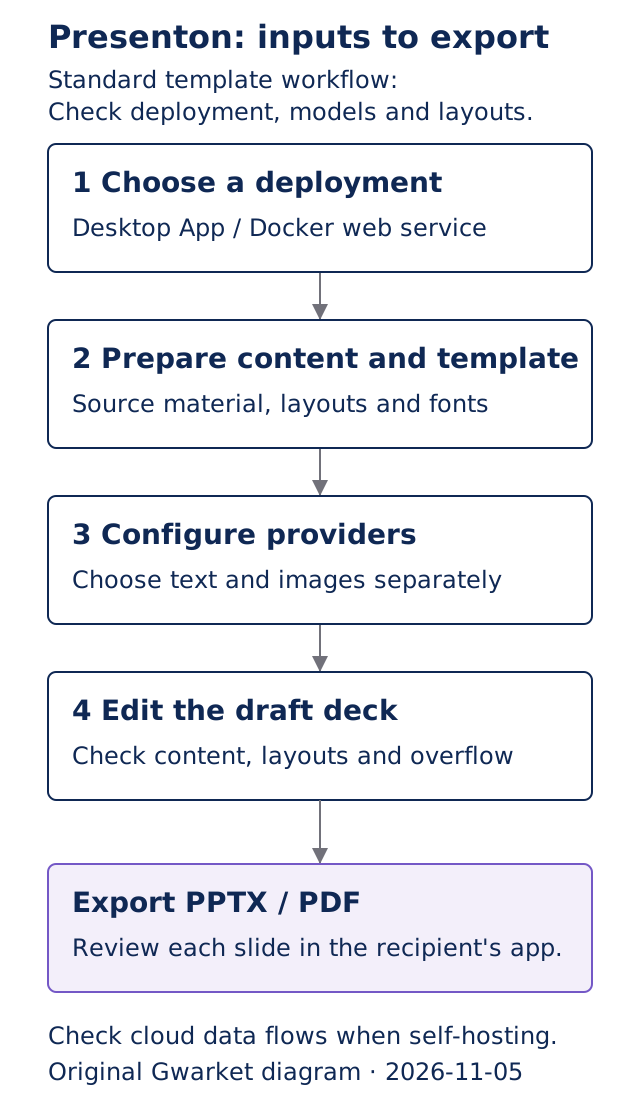
Original Gwarket diagram of the Standard template workflow, based on official documentation, November 5, 2026. Slide-by-slide review is our delivery recommendation; this is a workflow diagram.
Our first judgment: validate a few representative layouts before scaling the content. A branded deck may need a cover, comparison and chart layout. Try short titles, long text and real numerical formats in the layouts you expect to use. Font changes and overflow are easier to identify before applying a whole report.
Create a reusable PowerPoint template
The current template guide recommends a PPTX with representative content, rather than only an empty slide master:
- Check whether a built-in template already fits.
- Open Templates, start template creation and upload the PPTX.
- Review detected fonts and supply missing files you are licensed to use.
- Preview source slides, confirm the layouts, and name the template.
- Wait for generation, inspect the layouts, then review a short deck before wider use.
The pinned Template V2 documentation requires a vision-capable text model and structured JSON for template creation. Image generation is a separate provider setting; it does not replace the model that analyzes the slides. Later generation fills editable fields in the saved layouts.
Standard supports built-in and custom templates. Smart uses an adaptive workflow instead; restricting the deployment to Smart hides template features. See generation modes.
Resolve missing or substitute fonts and inspect wrapping, spacing and layout according to the font guide. A completed import alone is not a delivery check.
What changed in v0.9.12-beta?
The GitHub release is named electron-v0.9.12-beta, published October 26, 2026. Its release notes include:
| Change | Practical effect |
|---|---|
| GPT Image 2 | Replaces the previous DALL-E 3 option in Presenton; provider access and charges remain separate |
| Landmark, Nova and Signal | Additional template choices, still requiring content and font review |
| Role-based provider settings | Admins can view and update shared keys; regular users receive redacted runtime configuration |
The release ignores the legacy CAN_CHANGE_KEYS variable. Some Docker documentation examples still contain it; follow the same-version README's role rules and merged PR #984. This is a Presenton account role, separate from operating-system administrator privileges.
Self-hosting, cost and data flow
The code uses Apache-2.0. Model APIs, hosted generation, media and infrastructure charges are separate from the code license.
Our second judgment: map which services receive the content before choosing a deployment. A local interface and data folder may still use cloud text, images, search or Community features. Check providers and features individually when material must stay within an organization.
The official download-page privacy explanation makes the boundary configuration-dependent. The README also calls for disabling cloud-backed Community services in air-gapped deployments. Local inference still needs suitable hardware, language support and template-analysis capability. See deployment settings.
Review the exported PPTX
Presenton exports editable PPTX and PDF. Open the result in the software your audience uses and check fonts, overflow, chart values, images, links and slide order. Retain source material, templates and rebuild settings for revision. See export information and the font review guide.
If your work already uses an agent-led deck workflow, compare PPT Master. This page focuses on Presenton's application, self-hosting and template management.
A custom-template import returns 504
Record the version, stage, PPTX and font conditions, provider and backend progress. Follow the existing custom-template 504 guide before drawing a conclusion from the timeout alone.
In the older report Issue #816, a collaborator distinguishes a gateway timeout followed by backend completion from a renderer that never finishes. That is a diagnostic direction for the reported case, rather than evidence of one current cause or a universal fix in v0.9.12-beta.
Next steps
- Troubleshoot a custom-template 504: separate request timeouts from processing failures.
- PPT Master: compare another agent-led deck workflow.
- Check AI facts, inferences and judgments: verify evidence before delivery.
Sources and verification date
Verified November 5, 2026. Release changes are pinned to electron-v0.9.12-beta, commit 93b9dcf947f7. Website guides reflect the verification date; the download page and GitHub release versions are treated separately.
- README, release and Apache-2.0.
- Docker, template creation and fonts.
- Template V2 and generation modes.
- Role change PR #984, image option PR #967 and older report #816.
- Official downloads: packages, displayed version and data boundaries.