Start with Chat for a question or short draft, ChatGPT Work for a multi-step deliverable, and Codex when repository tools, commands and change review are central to the job. Work and Codex have overlapping capabilities; the distinction helps you choose an interface rather than assigning each product an exclusive task category. Availability also depends on your plan, platform, rollout and workspace permissions. See OpenAI's ways of working and desktop comparison.
Compare the work, capability and required access
| Experience and suitable work | What it can do | Plan and access conditions |
|---|---|---|
| Chat: questions, brainstorming, comparisons and short drafts | Discuss, search, summarize or revise text; available tools vary by plan | Available from Free. Select Chat in ChatGPT; file, tool and model limits still apply |
| ChatGPT Work: multi-step research and reviewable documents, spreadsheets or presentations | Plan a task, use materials and approved tools, create files, and run code when needed | Free and Go list limited desktop access; Plus and Pro list desktop, web and mobile. Business, Enterprise, Edu and other workspace access depends on permissions and rollout |
| Codex: repositories, implementation, testing and technical change review | Use files, terminals, developer tools and diff/review views; non-coding work can continue there too | Free and Go list limited desktop access, subject to rollout. Plans such as Plus and Pro offer broader access and usage. Codex Cloud has separate eligibility and is not included with Free or Go |
Plan details were checked on November 5, 2026 against ChatGPT pricing and Codex plan documentation, with the product access guide and Codex eligibility guide. A listed plan does not establish unlimited usage or access to every feature for every account.
Choose by the result you need this time
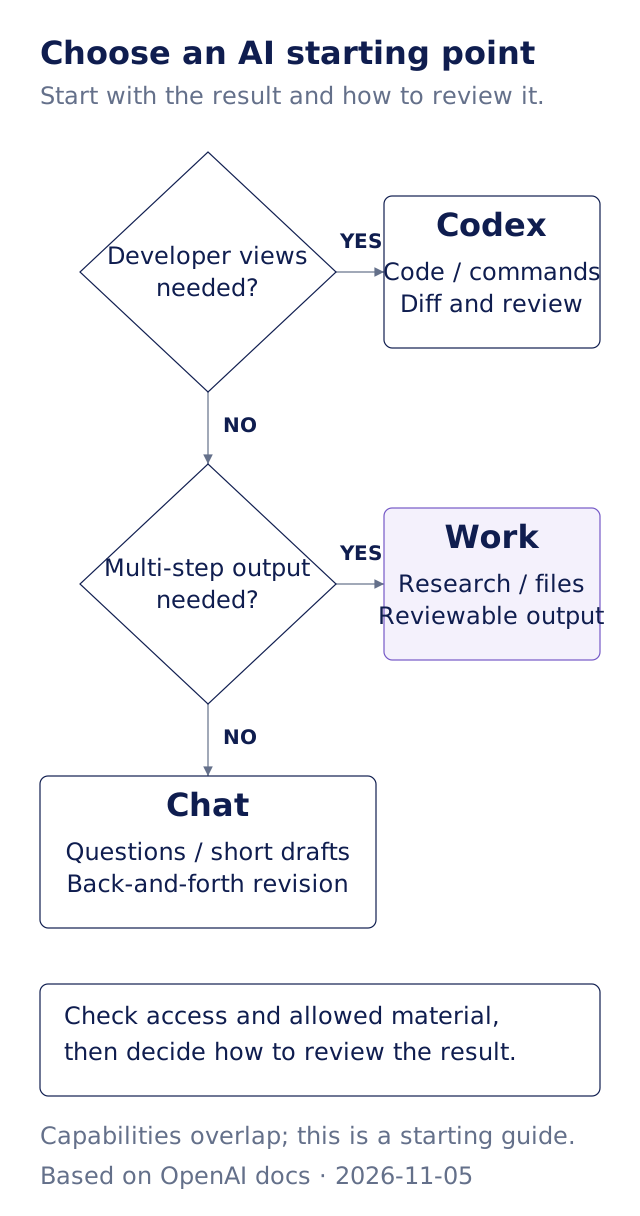
Original Gwarket scenario diagram based on OpenAI documentation, verified November 5, 2026. It is a starting heuristic, not a complete feature inventory.
Our first judgment: choose an interface by how you will review the result. Chat gives you a direct way to revise a short response sentence by sentence. A report assembled from several sources needs an agreed file and a way to check its evidence. A code change needs a file diff and relevant checks. Those review requirements make the first task easier to assess than choosing the experience with the longest feature list.
One job can also change interfaces. You might clarify a meeting's purpose in Chat, use Work to organize its sources and deck, then use Codex for a change to the reporting website. This is an editorial workflow example; it does not imply automatic transfer of chats, folders or permissions.
Where do you open Chat, Work and Codex?
In the desktop app, select ChatGPT or Codex from the product menu. Within ChatGPT, choose Chat or Work from the toggle. Chat and Work conversations appear together in Recents; Codex has a separate view and history. Eligible web and mobile accounts can select Work in ChatGPT and supply the task and materials. See the official starting steps.
Codex also has CLI, IDE extension and Codex Cloud entry points, subject to the chosen client and plan. Codex Cloud runs tasks in OpenAI-managed environments. Using mobile Remote to continue a task on your own computer is a different route and still depends on that computer and its access settings. Opening a task from a phone does not establish where it executes. See Codex setup and cloud access.
Our second judgment: when an entry point is missing, check the account, platform and effective permissions first. A personal account and a company workspace can expose different options. Work Local, Work Cloud, Codex Local and Codex Cloud access need not be enabled together. Check the applicable plan and administrator controls before deciding what to do next; a documented feature is not proof that it is enabled for your account.
If Work can run code, why choose Codex?
OpenAI explicitly describes overlapping capabilities. Work can run code, inspect files and work with repositories available to the selected environment; Codex can continue handling research, documents and presentations. Desktop differences include developer detail, diff/review views, an available pull-request pane and how the agent communicates. Work emphasizes reviewable outputs, while Codex exposes technical changes more directly. See the official desktop comparison.
If you already use Codex comfortably, a document task does not require rebuilding your workflow elsewhere. For a beginner, the useful criterion is understanding the result and how to correct it while granting only the material and access the task needs.
Do local files follow a task into the cloud?
A cloud environment does not automatically inherit your computer's files, apps, browser sessions or network access. Work needs the appropriate desktop capability, authorization and connection to use local resources. Where Local computer access with Work Cloud is available, the computer supplying local tools or files must remain online. Local execution does not establish that messages and task context stay only on the device. See the Work execution and device boundaries.
An available tool also does not grant access to any external account. Identify which service may receive the material, whose account a connection uses and which actions should stop for review. Continue with ChatGPT account and app data boundaries for that separate question.
Practice: make the first choice with one task card
Continue from the previous lesson's use-boundary exercise. Pick one low-risk job and complete four lines:
The problem I need to solve:
The result: a clearer question / a reviewable file / a technical change
Material I am allowed to provide:
How I will check the first version:
This is Gwarket's decision card. For a file-changing task, inspect the changes. For a report, compare figures and conclusions with the sources. If the deliverable is still unclear, clarify the question first.
Check usage and the result before sharing
ChatGPT Work and Codex share the applicable plan's usage and billing structure. Switching between them does not automatically provide another independent allowance. Task size, model, reasoning and tools affect consumption; regular Chat file, image and voice limits also need their own checks. Using Codex with your own API key follows API billing rather than the ChatGPT subscription allowance. See official usage guidance and Codex plan limits.
You have completed the lesson when you can explain why the chosen interface fits, which material you can provide and how you will inspect the result. The next lessons use Codex for a file-based task. If your main need is a document, spreadsheet or presentation, Work remains a suitable route. Review the actual result against the source before sending or publishing it.
Next steps
- Choose a low-risk first AI task: limit the work to a result you can inspect.
- Understand the Codex workspace: find conversations, changed files and command results if you choose Codex.
- Set Codex file, network and approval boundaries: choose the access for this task.
Sources and verification date
Verified November 5, 2026 against the official pages below. Plan, region, client, rollout and workspace controls can affect actual access. The scenario diagram and task card are Gwarket's editorial tools.
- OpenAI: Use ChatGPT: work patterns, overlapping capabilities and desktop differences.
- OpenAI: Get started with ChatGPT Work: outcome-based tasks, sources and review criteria.
- OpenAI: ChatGPT Work and Codex: desktop, web and mobile entry points and access controls.
- ChatGPT pricing and Work/Codex usage: limited Free/Go desktop access, paid access and shared usage.
- OpenAI: Using Codex with your ChatGPT plan: Cloud eligibility, Remote, API and plan boundaries.
- OpenAI: Work Overview: local/cloud execution, files and connection limits.