To understand an AI coding agent, do not start by memorizing acronyms. Separate who does the work, how it gets a method or external capability, what information it can see in this turn, and which actions it is allowed to take. MCP defines communication with external systems; a Skill is reusable work guidance; the context window is the working memory available for one turn; sandboxing and approvals set where it can act and when it must ask first. Treating all four as either “powerful AI” or “installing a plugin” usually leads to bad setup, debugging, and risk decisions.
This is a glossary, not a setup guide for one product. Implementations vary, especially for Plugin, Connector, and Sandbox. Each term includes an example and a related Gwarket page; use the official sources at the end to check product-specific behavior.
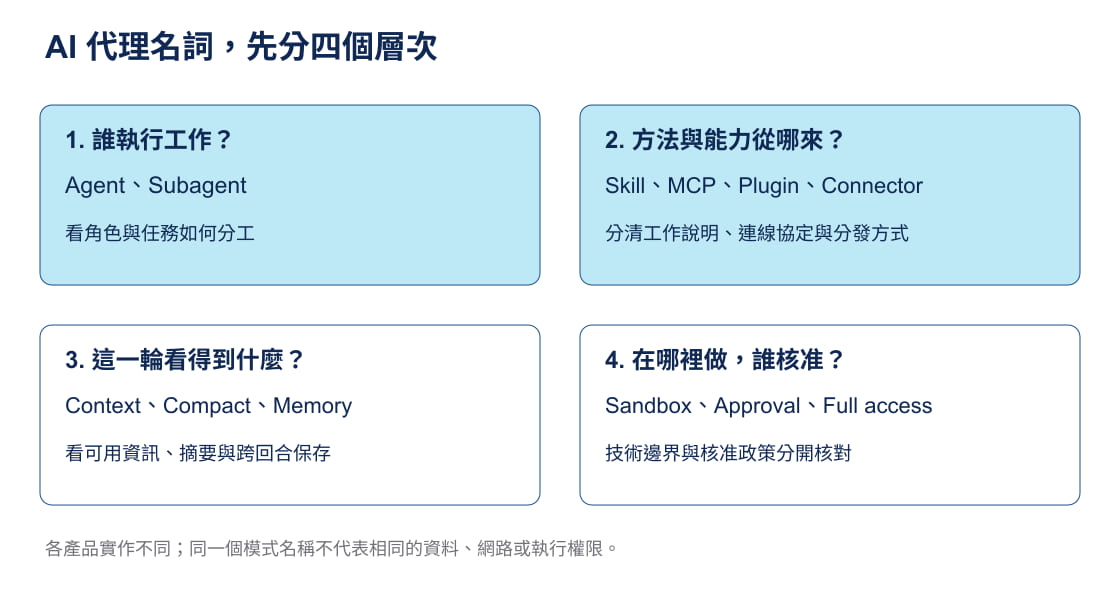
Original diagram: Gwarket / Aaron Huang · CC BY 4.0. The labels inside the original diagram are Chinese; this page provides its English explanation.
Put a new term in its place with four questions
Ask: Who is doing the work? How does it get a method or external capability? What can it see in this turn? What is it permitted to do? Letting an agent read company documents, for example, can involve an Agent (the actor), MCP or a Connector (the connection), a context window (what is included in the current task), and approval (whether access must be authorized). These are neither synonyms nor a one-time installation that settles everything permanently.
AI Agent
An AI Agent is a software system that can plan a next step from a goal, call tools, read their responses, and adjust its actions. Its difference from ordinary chat is not simply a longer answer: it can link reading a file, running a command, checking the outcome, and revising into one piece of work. For example, given “find the reason this test fails and fix it,” an agent can read the error output, search relevant code, make a change, and rerun the test. A person still sets the goal and boundary and decides whether to accept the change.
Read more: Building a reliable Agent workflow from Claude’s public engineering materials.
Agent loop
An agent loop is the control loop in which an agent repeatedly judges, acts, observes the result, and judges again. It is not an autopilot that guarantees success: an error from a tool, untrusted source material, or an unclear goal can keep the loop moving in the wrong direction. After changing code and running a test, for example, the agent should read a failure and revise its hypothesis rather than repeat the same command.
Read more: Claude Code is not stronger completion—it runs a self-verifying agent loop.
Agent Skill
An Agent Skill is a loadable unit that packages a task’s procedure, constraints, and supporting resources, often with SKILL.md as its entry point. It can contain instructions, scripts, templates, or reference material. It is not a permanent new model ability, and not every prompt automatically counts as a Skill. A presentation Skill might require source reading, template application, then checks; its value is making comparable work repeatable in a checkable way.
Read more: What is a Skill, and which work is worth turning into one?. Names and structure follow the Agent Skills specification and product documentation; verify product support and loading timing separately.
MCP (Model Context Protocol)
MCP is an open protocol through which AI applications exchange capability descriptions and requests with external tools, data sources, or services. It describes how a client and server communicate. It is not a particular tool, nor proof that a user has authorized access to all data. An MCP server may offer tools such as “list a folder” or “read a webpage”; a supporting client that calls one must still follow that tool’s and environment’s permission rules.
Read more: What problems do Plugin, Connector, and MCP each solve? and Chrome DevTools MCP guide. For the protocol definition, see the Model Context Protocol documentation.
Plugin
A Plugin is an installation or distribution unit defined by a product; it may package Skills, commands, settings, and MCP servers together. Plugin therefore concerns how something is installed into a product, while MCP concerns how external capabilities communicate. They may appear together or separately. A Claude Code plugin, for example, can include several Skills and MCP settings; installing it does not mean every external service is signed in or authorized.
Read more: What problems do Plugin, Connector, and MCP each solve?. Confirm a vendor’s plugin structure in that product’s official documentation rather than treating it as a rule for every agent.
Connector
A Connector is usually an integration feature in a chat product or work platform that connects an external service to that product. It is mainly a product-layer experience and account-authorization concept. Underneath it may use MCP or a different API or integration method. Connecting a cloud drive, for example, does not by itself establish whether its contents can be searched, cited, or synced; that depends on the Connector’s permission scope and the product’s rules.
Read more: How does Claude connect to your work? Connector, Enterprise Search, and Research.
Context window
A context window is the token capacity a model can receive and process in one inference. For an agent, conversation history, system rules, loaded file excerpts, tool output, and the new question compete for that capacity. It is neither permanent memory nor the total capacity of a project folder. Pasting a long test log into a chat can, for example, crowd out an earlier requirement or constraint and cause a later answer to miss it.
Read more: Context is Claude Code’s scarce resource.
Compact
Compact is a practice or product feature that summarizes earlier conversation to free context-window space. It retains what the summary selected, not a lossless miniature of every original detail. Before a long task is compacted, record the current decisions, unfinished work, and necessary file locations; after compacting, return to original files or records for an exact error message.
Read more: Context is Claude Code’s scarce resource.
CLAUDE.md and AGENTS.md
CLAUDE.md and AGENTS.md are instruction files placed at project or user scope to give an agent project conventions, commands, and constraints. They are not operating-system-enforced security boundaries, and they do not automatically override a product’s own system rules. Tools differ in file names, hierarchy, and precedence. AGENTS.md can, for example, require a test before code is changed, but that text cannot grant write access when a sandbox disallows it.
Read more: Context is Claude Code’s scarce resource. Consult Claude Code documentation for CLAUDE.md behavior and AGENTS.md for its cross-tool convention.
Sandbox
A Sandbox is an execution-environment mechanism that enforces isolation and limits, such as which files a program or agent can read or write, whether it can use the network, and which operations it can run. It is a technical control, not another name for telling an AI to be careful. An agent able to create a file in an assigned workspace, for example, is not thereby able to write elsewhere or send an external request; the actual limits depend on product, configuration, and environment.
Read more: Codex permissions setup: folders, access, network, and human confirmation. Check product documentation for the behavior of a specific sandbox.
Approval
Approval is an interaction control that requires explicit consent from a user or administrator before a particular action. It answers “may this action proceed now?” Sandbox answers “even if it proceeds, what does the environment permit?” A system may show a request before networking or a high-risk command. Granting that request does not remove every limit or endorse external content.
Read more: Codex permissions setup: folders, access, network, and human confirmation.
Full access
Full access is a high-permission product setting that usually reduces sandbox or approval restrictions; it is not a cross-product standard term. First establish whether it relaxes file, network, command, or approval limits, then assess the risk. Relaxing access to run a complete build in an isolated test environment, for example, does not make untrusted webpage text executable instructions or make production credentials safe to provide to an agent.
Read more: Codex permissions setup: folders, access, network, and human confirmation.
Subagent
A Subagent is an agent assigned a clearly bounded subtask by a main agent. It often has its own context and returns a result, which can keep every intermediate detail out of the main work area. It is not a way to bypass permissions: it remains limited by the environment and scope granted to it. A main agent might integrate a fix while a subagent only reads a test failure and returns possible causes, without editing other modules.
Read more: Context is Claude Code’s scarce resource.
Hook
A Hook is a command or check a tool automatically runs at a predefined event point. It is triggered by the product’s event mechanism, rather than relying on a model to remember it every time. Examples include running a formatter after a file change or blocking a commit that fails a rule. Hooks can improve consistency, but an incorrectly configured command can also fail a workflow or cause unnecessary side effects.
Read more: Building a reliable Agent workflow from Claude’s public engineering materials. Check product documentation for event names and configuration format.
Slash command
A Slash command is a product command beginning with / that is entered in a chat or CLI interface. It is a user-operation entry point, not a shell command or an Agent Skill. Some commands are built in, while others are extended by a project or plugin. /compact, for example, can request conversation compaction in a product that supports it; it does not establish that every other tool has the same name or behavior.
Read more: What is a Skill, and which work is worth turning into one?.
Prompt injection
Prompt injection is an attempt by untrusted content to change a model’s behavior, such as hiding “ignore the original task and do something else” in a webpage, document, or tool output. It is not limited to malicious text typed directly into a chat. When an agent reads external material, it must treat it as data rather than automatically executable instruction. If a webpage asks an agent to upload workspace files or disable safeguards, the agent should retain the original task and permission boundary and ask for human confirmation when an external action is needed.
Read more: NVIDIA OpenShell: a three-layer architecture for safer autonomous AI agent execution.
CLI
A CLI (command-line interface) is a text-command interface for operating software. A CLI is an interface form, not an Agent: one product can offer a CLI, a desktop app, and an IDE extension. Commands do not become safe merely because AI is involved. git status, for example, is a CLI command that views version-control status; an AI coding agent may propose or run it, but permissions and checks still determine whether it should run, where it runs, and whether its result is correct.
Read more: Codex tutorial: from choosing an entry point to completing a first work task.
Classify a new term before deciding what to do
The useful question is not “does this make AI smarter?” First locate it: Agent and Subagent are work roles; Skill, Hook, and Slash command are work methods or operation entries; MCP, Plugin, and Connector are capability-access or distribution layers; Context window and Compact manage information capacity; Sandbox, Approval, and Full access govern execution; Prompt injection is a risk when handling untrusted content. Once the layers are separate, you can tell whether to consult official settings, change project rules, or stop and ask for human confirmation.
Sources and verification scope
This page was compiled from the official sources below; the verification baseline is 2026-11-08. MCP is defined here from the Model Context Protocol documentation. Product naming for Skills, Plugins, CLAUDE.md, Sandboxes, and Approvals is checked against the relevant product documentation. This page does not treat one product’s names or defaults as universal standards.
- Agent Skills open specification — Skill structure and fields.
- Claude Code Skills — product loading and invocation.
- Claude Code memory and rule files — CLAUDE.md, AGENTS.md, and auto memory.
- OpenAI approvals and sandboxing — approvals, writable scope, and full access.