MCP (Model Context Protocol) is an open standard through which an AI application can connect to external tools and data using a shared protocol. On a first connection, the important outcome is not installing many servers. It is proving one narrow connection: which program starts, which folder it may read, and what happens when a request falls outside that boundary.
MCP is neither a chat model nor one vendor’s plug-in store. It defines how an AI application and an external capability exchange information; the official introduction compares that shared interface to USB-C. MCP introduction
This page includes a small downloadable exercise built around the official filesystem MCP server and one synthetic folder. The recorded exercise completed initialization, listed read-only tools, listed a directory, read one exact file, and rejected a read outside the allowed directory. Its client is a small deterministic JSON-RPC client—not Claude, Codex, a model API, or an account integration.
One MCP connection has a Host, Client, and Server
| Role | Responsibility | Position in the recorded exercise |
|---|---|---|
| Host | An AI application that manages MCP connections and decides how permissions and tool calls are presented | No Host was used |
| Client | A connection component that a Host creates for each Server and that exchanges protocol messages | The small JSON-RPC client in verify.mjs |
| Server | A program or service that exposes tools, resources, or prompt templates | @modelcontextprotocol/server-filesystem 2.2.0 |
The MCP architecture defines a Host creating a Client for each Server and maintaining separate connections. The protocol does not prescribe which model a Host uses, how its UI works, or which user decisions it makes automatically. MCP Architecture
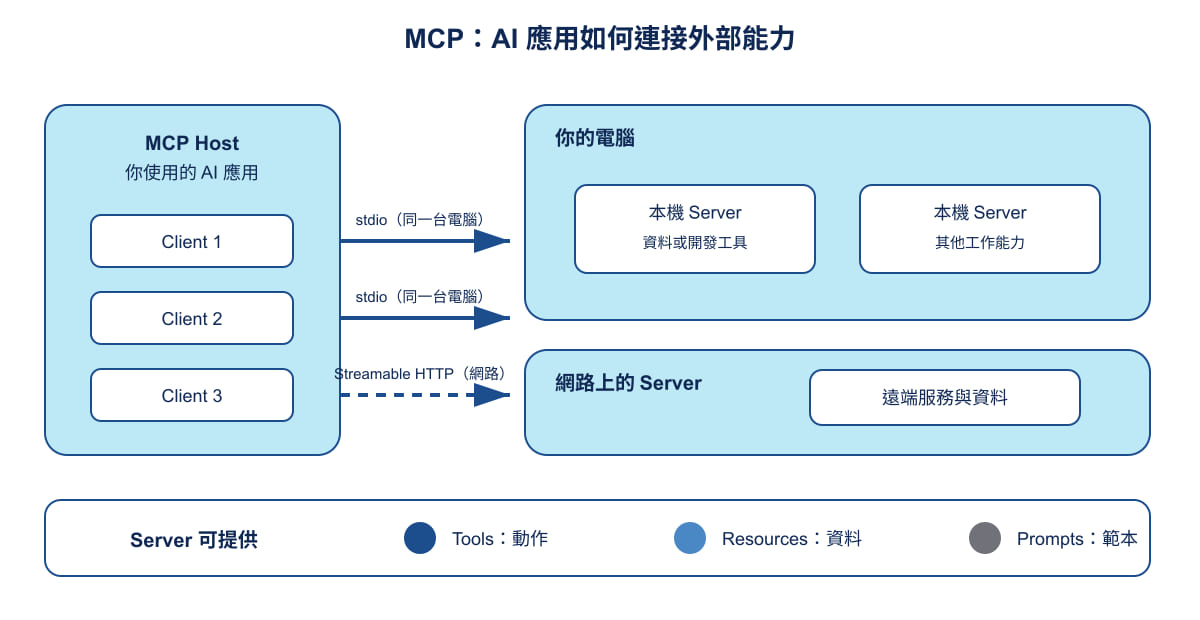
Gwarket / Aaron Huang teaching diagram · CC BY 4.0. The original SVG is reused unchanged and its labels are Chinese; the Host, Client, and Server relationships are explained above.
Servers commonly provide three kinds of capability:
- Tools let a model call an external system, such as a database query, an API, or a calculation. Hosts should make available tools and call prompts visible and give people a chance to confirm or decline. MCP Tools specification
- Resources expose context such as files, database schemas, or application information; the Host decides how people select or include it. MCP Resources specification
- Prompts are Server-provided prompt templates that a user explicitly selects. MCP Prompts specification
An instruction and an endpoint require different checks
| Documentation gives you | Transport | What to inspect |
|---|---|---|
| A startup command | stdio | The Client starts a subprocess. Inspect its program, arguments, and allowed directories. |
| An MCP endpoint URL | Streamable HTTP | The Server runs independently. Inspect the operator, sign-in flow, and authorization scope. |
stdio exchanges JSON-RPC through standard input and output. Streamable HTTP sends messages to one endpoint; a response can be JSON or an SSE stream scoped to that request. MCP Transports specification
A recorded minimal connection: read one public practice folder
The downloadable archive deliberately contains only three inspection files: verify.mjs, package.json, and README.md. The README describes the synthetic input and the expected verification record; the verification script creates and checks its local practice data. This is a teaching package, not a claim that any AI Host has been connected.
- Download the MCP first read exercise
- Read the exercise requirements and limits
- Inspect the verification program
The recorded run used Node.js v24.14.0, @modelcontextprotocol/server-filesystem 2.2.0, stdio, and protocol version 2025-11-25. It starts the filesystem Server with --read-only and the synthetic public-notes folder as its only allowed scope. It does not call a model API, use an external account, read private files, or invoke a write tool.
Input, allowed scope, and observed result
The exercise’s synthetic note is public-notes/meeting.md. Its Chinese source text records three public-practice statements: a product FAQ draft was completed, video captions still need confirmation before 10 November, and no launch date has been decided. It is not account data or a model response. In English, the key terms are: 產品 FAQ 初稿 (product FAQ draft), 示範影片字幕 (demo-video captions), and 上線日期尚未決定 (launch date undecided).
verify.mjs starts @modelcontextprotocol/server-filesystem 2.2.0 with --read-only public-notes. The deterministic client then sends initialize, tools/list, list_directory, and read_text_file through stdio. It passes only when the returned text exactly matches the synthetic note.
| Check | Recorded result | Why it matters |
|---|---|---|
| Initialization | Passed; protocol version 2025-11-25 |
Confirms that the two programs completed a protocol handshake. |
| Tool list | Passed; no write_file or another write tool was registered |
Checks the recorded read-only tool registration. |
| Directory listing and exact file read | Passed; meeting.md was found and read back |
Produces more evidence than a generic “connected” message. |
| Read outside the scope | outside-allowed.txt was explicitly denied |
Confirms that this Server enforced its directory boundary. |
The recorded tools include read_text_file, list_directory, directory_tree, search_files, and get_file_info; no write tool was recorded. The denial says that outside-allowed.txt is not inside the permitted public-notes directory. A nearby path does not acquire read access merely because it belongs to the same practice package.
Re-run the protocol exercise before touching work data
The exercise requires Node.js 24 or later. In the extracted mcp-first-task directory, run:
npm install --ignore-scripts
npm run verify
The expected output includes passed: true and creates verification.json plus protocol-log.json. The first is a readable check summary; the second retains sent and received JSON-RPC messages. Both can contain local paths, so inspect them before sharing. A successful run proves this bounded filesystem exercise, not a successful Claude Code, Codex, or other AI-Host connection.
Documented Claude Code setup: a separate, unrun Host path
The following is a documented local-scope stdio setup based on the Claude Code MCP documentation. It was not run for this article. You need Claude Code already installed and signed in under your own account. The portable protocol exercise above needs neither Claude Code nor an account.
After completing npm install --ignore-scripts and npm run verify in the extracted mcp-first-task directory, open PowerShell in that same directory. The verification step creates the synthetic public-notes folder:
$exercise = (Resolve-Path .).Path
claude mcp add --transport stdio gwarket-mcp-first-task --scope local -- node "$exercise\node_modules\@modelcontextprotocol\server-filesystem\dist\index.js" --read-only "$exercise\public-notes"
This command intentionally avoids npx: node runs the existing locally installed package. Before -- are Claude Code’s transport, name, and local-scope settings. After -- are the Server command, the preserved package path, --read-only, and its permitted directory. According to the official documentation, a local scope applies only to the current project and is not written into project version control. Add a local stdio Server · Local scope
Start claude and use /mcp to inspect whether gwarket-mcp-first-task appears. If it does, use a request that names the allowed tool source, for example: “Use only the gwarket-mcp-first-task MCP Server to read the original meeting.md; do not substitute another tool.” Then request outside-allowed.txt from the same package.
The latter request should be denied by this filesystem Server because it is outside public-notes. That denial demonstrates only this Server’s configured path boundary. It does not restrict Claude Code’s native tools or any other MCP Server the Host may have configured.
Remove the local configuration when you are done:
claude mcp remove gwarket-mcp-first-task --scope local
The official documentation also lists claude mcp list, claude mcp get <name>, claude mcp remove <name>, and in-session /mcp for managing or inspecting Servers. Different Hosts can support different transports, configuration formats, and approval flows; an MCP specification does not make this Claude Code setup a configuration guide for another Host. Manage Servers
MCP and an API have different integration jobs
An API is the interface offered by a service. MCP standardizes capability discovery, description, and invocation, plus the exchange between a Host and Server. An MCP Server can call a service API internally, so the two commonly appear together.
For a fixed workflow—for example, exporting the same report each day—a direct API call is often easier to test and debug. A model can also choose APIs dynamically through a custom tool framework; that ability is not exclusive to MCP. MCP is useful when compatible Hosts and Servers can share an integration pattern and capability descriptions, not because it replaces APIs.
Three pause points before you connect work data
Before startup, inspect the program and its data scope
A stdio Server is a subprocess started by a Client. Its command, arguments, working directory, and environment variables are part of the security review. This exercise reduces scope to a synthetic directory because “can read files” is a concrete data boundary, not an abstract capability. stdio specification
For a remote Server, review sign-in separately from authorization
HTTP authorization is optional; when implemented, the specification is based on OAuth 2.1. stdio should not use the HTTP authorization flow and instead receives credentials from its execution environment. In either case, pause when a sign-in screen asks for more access than the task needs. MCP Authorization specification
While using tools, keep calls visible and rejectable
Tools can query external systems, calculate, or perform actions. The specification recommends that a Host show exposed tools and call prompts and let people approve or decline. On a first real Host integration, start with a readable task and a result you can check; only then decide whether the new capability justifies its data scope. MCP Tools specification
Questions that remain important
Does MCP itself cost money?
MCP is a protocol, not a product plan. Its documentation does not price a Host, Server, or the service behind either one. Check the official plan pages of the products you choose for prices and account terms.
Can one Server work in multiple AI tools?
The protocol aims to let Clients and Servers exchange capabilities and context in a common way. A Host’s supported transports, authentication, configuration format, and user interface can still differ, so verify each Host against its own official documentation. MCP introduction
Does installing MCP automatically expose all my data?
No. Reachable data and executable actions depend on the Server, granted credentials, allowed directories, and Host implementation. The exercise’s out-of-scope denial illustrates why data scope should be checked from actual configuration and results—not inferred from an integration’s name.
Next reading
- Plugin, Connector, and MCP: what is different?
- Chrome DevTools MCP Chinese guide
- How to choose Browser-Use or MCP
Sources and verification date
Verified source date: 2026-11-08.
- What is the Model Context Protocol (MCP)? — definition, scope, and USB-C analogy.
- Architecture overview — Host, Client, Server, and protocol scope.
- Transports — stdio, Streamable HTTP, and JSON-RPC message exchange.
- Tools, Resources, and Prompts — Server capabilities and user selection.
- Authorization — HTTP authorization and the stdio distinction.
- Filesystem MCP Server — local filesystem tools; this exercise pins package version
2.2.0. - The supplied exercise evidence:
verification.json— recorded stdio verification with Node.jsv24.14.0and filesystem Server2.2.0.