Your first task with Claude Code does not need to be a large refactor. Start with a small, reversible practice project and complete one closed loop: confirm installation and sign-in, read the code without changing it, request one tested fix, then inspect the tests and the diff yourself. The supplied program deliberately contains a pricing bug so you can see the difference before and after the fix.
Claude Code can read a codebase, modify files, and run commands; the official overview lists terminal, IDE, desktop-app, and web entry points. The beginner skill is not granting it broad access at once. It is making sure every step has inputs and results you can inspect. Official overview
Decide what this practice task must prove
This exercise has one job: fix the totalPrice function so that every item's price × quantity is included. The download is an authored, locally runnable Node.js example. It contains no API key, account data, or external service.
Download and unpack first-task.zip. Its starter/ folder is the deliberately faulty starting point; reference/ is the expected result for comparison. Both contain the same test file.
You need Node.js 20 or later. From starter/, run:
node --test total-price.test.mjs
The observed local Node.js fixture results are: starter/ has 1 passing and 2 failing tests; reference/ has 3 passing and 0 failing tests. You can inspect both the tests and the reference fix in the download. These are authored-fixture verification results, not a Claude Code run or a measurement of model capability.
Install and sign in, then confirm the CLI works
If you choose the CLI, follow the official Advanced setup instructions for your operating system. After a native installation, open a new terminal and run claude --version to confirm that it prints a version. The official Windows PowerShell install command is:
irm https://claude.ai/install.ps1 | iex
For macOS, Linux, or WSL, the same official setup page provides the native installer:
curl -fsSL https://claude.ai/install.sh | bash
When starting your first CLI session, follow the on-screen sign-in steps. A subscription and Anthropic Console/API use different account and billing paths. This local fixture needs neither an API key nor a paid service, but the requirements for starting Claude Code itself remain those in the official documentation. Available entry points, account requirements, and plans can change, so check official setup, the official overview, and Claude pricing before you begin.
Read only before you ask for a change
First, keep a copy of the starting file outside starter/. In Windows PowerShell, run:
Copy-Item -LiteralPath .\total-price.mjs -Destination ..\total-price.before.mjs
claude
On macOS or Linux, use cp total-price.mjs ../total-price.before.mjs to retain the original, then run claude. The backup stays outside starter/; the task below is limited to reading three named files.
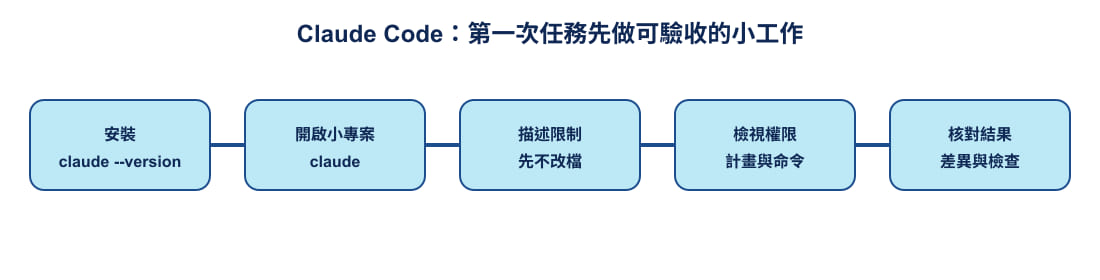
Authored diagram: Gwarket / Aaron Huang · CC BY 4.0 ·
After the session starts, give it this instruction:
Read only
README.md,total-price.mjs, andtotal-price.test.mjs. Explain what this exercise needs to calculate, what the current function misses, and which tests will fail. Do not modify files, install packages, or run commands that change data.
Do not judge the response by how fluent it sounds. Check whether it identifies that the function currently adds only price, while the tests require it to include quantity; the empty-list test should still pass. If it reads other files, suggests installing dependencies, or treats an unknown as a conclusion, narrow the scope before continuing.
Assign one bounded fix
Only after the read-only understanding matches the exercise should you give it this request:
Modify only the
totalPricefunction intotal-price.mjsso that each item's total isprice * quantity, then add all items together. Do not modify the tests or README, add files, or install packages. When finished, runnode --test total-price.test.mjsand report which line changed, the test result, and the scope that remains unhandled.
The point of this prompt is that it states both what may change and what may not. The reference implementation changes the function core to:
return items.reduce((sum, item) => sum + item.price * item.quantity, 0);
That is the teaching material's reference answer. It does not claim in advance that Claude will produce it. The supplied README.md also defines the exercise boundary: it handles only non-negative integer prices and positive integer quantities, not tax, discounts, or currency conversion.
Check the tests, then inspect the diff
Before accepting a change, rerun the tests yourself from the same folder:
node --test total-price.test.mjs
All tests passing means only that three cases match their expectations. It does not automatically prove the task definition, data validation, or other payment rules are correct. Next, inspect the file diff shown by Claude Code. Confirm that only total-price.mjs changed and that multiplication happens before the total is accumulated. On Windows, you can also compare the saved starting point in the terminal:
Compare-Object (Get-Content ..\total-price.before.mjs) (Get-Content .\total-price.mjs)
<= marks a line found only in the starting version; => marks a line found only after the fix. This exercise does not require you to create a Git repository first. Keeping the first task small lets you evaluate the task statement, change scope, and verification result together.
Claude Code's permission modes determine when tool calls need your confirmation. When you need to understand the proposed direction before a change, use plan mode to review the plan and then decide whether to proceed. Do not make skipping confirmations the default for a first exercise. Permission modes
If the result is wrong, return to a reversible state
If the tests still fail, it changed the tests, or the diff exceeds scope, do not keep appending “fix it again” in the same conversation. Preserve the failing output, exit the session that can write files, and restore the starting backup. In Windows PowerShell:
Copy-Item -LiteralPath ..\total-price.before.mjs -Destination .\total-price.mjs
node --test total-price.test.mjs
On macOS or Linux, use cp ../total-price.before.mjs total-price.mjs. Seeing two failures again after restoration is the deliberately retained starting state, not a new error. Then ask a smaller question—for example, ask only for an explanation of one failing case, or only for a plan.
This teaching material gives you two safe reference points: starter/ lets you repeat the exercise, and reference/ lets you compare the expected fix. Compare the tests and the diff before deciding whether to keep any change; do not skip your own acceptance check because an agent appears confident.
Continue the Claude Code learning series
For the next step, follow these related guides:
- Context is Claude Code's scarce resource.
- Claude Code runs an agent loop.
- Understanding Claude as an AI work platform.
Sources and verification boundary
Verification date: 2026-11-08.
The supplied tests were run locally with Node.js on 2026-11-08: starter/ had 1 pass / 2 fail, and reference/ had 3 pass / 0 fail. They are verification results for the teaching fixture, not measurements of Claude Code or model ability.