ChatGPT Work can turn a small set of supplied materials into a document, spreadsheet, presentation, or report that a person can review. Your first task does not need automation: run the full loop—provide files, write a clear brief, wait, inspect the draft, correct it, then decide whether to share it—and make sure every row can be traced back to a source.
For a question, a quick rewrite, or brainstorming, Chat is usually more direct. For code changes, commands, tests, and diffs, use Codex. Work is for keeping multi-step organization of material and delivery of a result in one task, so that a person can decide what happens next after the draft is ready.
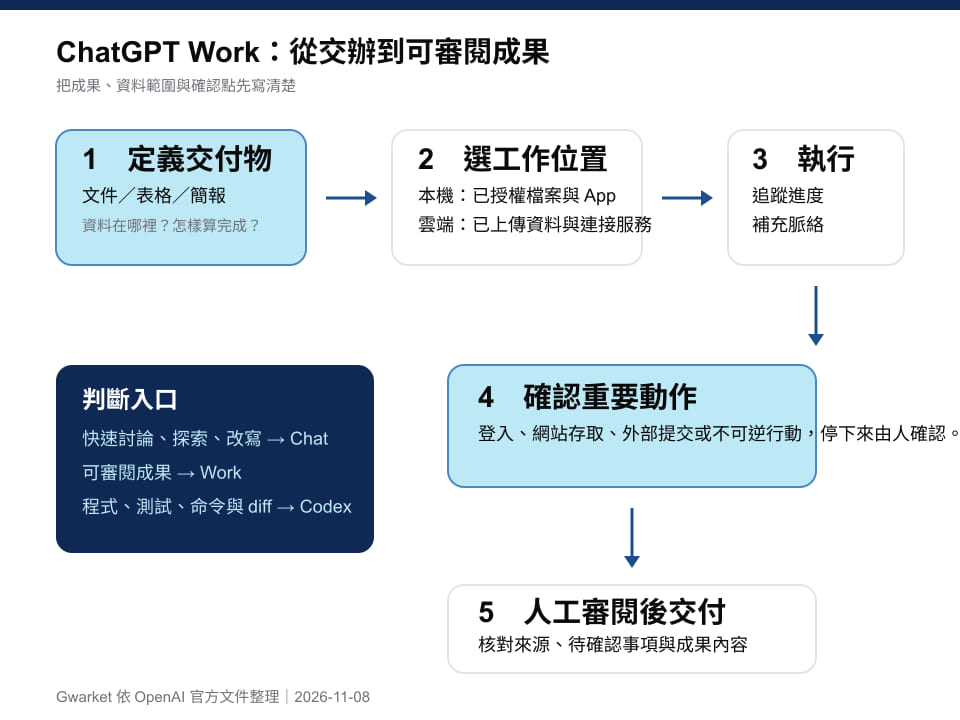
Original diagram: Gwarket / Aaron Huang · CC BY 4.0 ·
Diagram: Gwarket’s summary of official OpenAI documentation, 2026-11-08. The supplied original SVG retains its Chinese labels.
Start with the right entry point: review deliverables and technical changes separately
| What you need to do | Preferred entry point | What to review at the end |
|---|---|---|
| Clarify a question, revise quickly, or discuss back and forth | Chat | Whether the answer is accurate and the tone fits |
| Organize several materials into a weekly report, spreadsheet, presentation, or report | Work | The deliverable, its sources, and items still to confirm |
| Change code, run commands and tests, or inspect changes | Codex | The diff, test results, and execution output |
This is not a comparison of capability. The useful question is whether the delivery needs a readable result or reproducible evidence of a technical change. Start with Work for the former and Codex for the latter. They can provide material to each other when needed, but they should not be accepted as the same kind of evidence.
Complete a first weekly-report task with three fictional records
The example below uses three fictional meeting records. The November 2 record sets a first draft for a payment FAQ and a subtitle deadline. The November 4 record says that the FAQ is awaiting review. The November 6 record says the FAQ still needs refund conditions, the subtitles await manager confirmation, and neither a website launch date nor a publishing owner has been decided. The gaps are deliberate: they let you check whether an organizing process turns unknowns into completed work.
Download the three meeting records and the authored teaching reference answer (Chinese originals). You can also get N01-1102.md, N02-1104.md, and N03-1106.md separately; these source teaching files remain in Chinese. For the exercise, provide only the three meeting records. Do not give reference-report.md to Work until you have finished; use it afterward for comparison.
1. Provide the files first, then give a checkable brief
Open Work in a supported ChatGPT web or app experience. On desktop, switch between Chat and Work in the ChatGPT view. If that entry point is unavailable, first check whether your account, plan, and workspace have access rather than assuming Work is enabled in ordinary Chat. Add the three meeting records to this task. First ask it to list the filenames it received; after all three are present, paste the brief below. It asks only for a draft. It does not request sending, uploading, or changing the original files.
Use only the three meeting records supplied in this task: N01-1102.md, N02-1104.md, and N03-1106.md. Create a one-page weekly report as a Markdown table with these columns: “Completed This Week,” “Open Decisions,” “Owner for Next Week,” “Due Date,” and “Source.” Every row must name its source file. When an owner, due date, or approval status cannot be found, write “To be confirmed”; do not invent it. Give me a draft for review first. Do not send, upload, modify, or delete any file.
The point of this brief is not to make the prompt longer. It fixes the material boundary, output fields, and treatment of unknown values in advance. Work can handle research, analysis, and document-oriented results; specific inputs make it easier to compare each part of the result with the original materials.
2. Wait for progress, but treat the first result as a draft
While a task is running, you can add context or adjust the direction. Once the result returns, first check that it used only the three named materials, then open each record and compare it. This is not merely procedural. The same word can indicate different states in work tracking, and dropping one qualifier can change the next decision.
3. Use the authored teaching reference answer to find corrections
The table below is an authored teaching reference answer based on the three records. It is not an actual Work output. This English table translates the teaching content for this article; the downloadable originals remain Chinese. Its purpose is to let you test whether the draft preserves the relationship between a row and its sources.
| Completed This Week | Open Decisions | Owner for Next Week | Due Date | Source |
|---|---|---|---|---|
| Payment FAQ draft submitted; it is not final | Add refund conditions, then review again; follow-up deadline to be confirmed | Yijun (FAQ); reviewer name to be confirmed | Original draft date: 11/5; follow-up deadline to be confirmed | N01, N02, N03 |
| Demo-video subtitles proofread | Manager confirmation; manager name to be confirmed | Azhe (subtitles); approver to be confirmed | Original deadline: 11/10; no change recorded | N01, N02, N03 |
| Launch date not yet decided | Discuss after FAQ and video are confirmed; publishing owner to be confirmed | To be confirmed | To be confirmed | N01, N03 |
There are three common corrections to make. First, “draft submitted” must not become “FAQ finalized,” because N03 explicitly says refund conditions are still needed. Second, “subtitles proofread” does not mean the video is approved; manager confirmation remains open. Third, when no launch date, reviewer, or publishing owner is recorded, keeping “To be confirmed” is more useful than filling in a plausible name.
4. Correct the draft, save it, then decide whether to share it
Feed the comparison back to Work—for example, “Keep manager confirmation as an open decision in row two; do not add a launch date in row three”—and ask for a new version. Only after every row traces back to a source and the unknowns remain visible should you pass the document to the real reviewer or share it through your team’s process. If you repeat this task, keep the brief and acceptance checklist, not an unchecked output from one run.
After checking the draft, make one explicit save request:
Create the version we just checked as
weekly-report.md, keeping the source for every row. This time, you may create only this new file; do not modify the meeting records or send or publish anything. When finished, provide the file so I can open and check it.
Open the output file and confirm that its text and table remain readable and that the Source column is still present. You then decide whether to share it with colleagues. For row-by-row checking, see the authored teaching reference answer (Chinese original). The table wording need not match word for word, but its states, dates, names, and unknowns must match.
Local and cloud work differ in the material boundary
| Material or situation | Usually the better fit | Confirm before starting |
|---|---|---|
| Files already supplied, connected services, or public web information | Cloud Work | The sources and accounts available to this task |
| Files that exist only on your computer or in desktop apps | Desktop Local Work | That only the necessary data is authorized |
| You need to continue viewing the result across devices | Cloud Work | That your workspace permits its use |
Official guidance describes Work on web and mobile as cloud work. On desktop, local files and desktop apps can be used only when plan and workspace conditions are met and access has been authorized. Local work does not mean all context stays only on the computer: messages and task context may still be stored in the cloud. Starting with a small set of necessary materials is therefore easier to review than connecting everything at once.
The cloud browser has an isolated work session. Handle sign-in and actions requiring human involvement according to the prompt you receive. Whether material is local or in the cloud, the final questions are the same: can the result name the sources it used, show what still needs confirmation, and tell the next person what to check?
Keep the acceptance conditions as the starting point for next week
- All three specified sources are listed, with no material that was not provided.
- Every completed item and open decision can be traced back to the original records.
- Drafted, proofread, and approved states are not conflated.
- Dates, names, and owners without a source remain marked “To be confirmed.”
Once all four pass, use the same specification for the following week. What is repeatable is not one prompt alone, but the combination of material scope, result format, source checking, and correction rules.
Sources and verification date
- OpenAI Help: ChatGPT Work and Codex, checked 2026-11-08.
- OpenAI Developers Training: Getting started with ChatGPT Work, checked 2026-11-08.
- OpenAI Help: Using cloud browser in ChatGPT, checked 2026-11-08.
- OpenAI Help: Agent Security and local work sync in ChatGPT, checked 2026-11-08.