Do not begin by asking which model is strongest. Begin with where the tool will work, what inspectable result it should deliver, and which files and commands you are willing to let it touch. If you already subscribe to ChatGPT or Claude, Codex or Claude Code is usually the lowest-friction starting point. Heavy IDE users should look at Copilot or Cursor; OpenCode is the relevant option when you need your own provider or a local model. Google users should treat Antigravity and the older Gemini CLI as separate paths.
This compares documented interfaces, pricing, and permission controls; no same-task performance benchmark was conducted. A model, an IDE, and a CLI or desktop agent operate at different layers: the model affects the reasoning and code it can produce; the IDE affects how you inspect diffs, test, and merge; and a CLI or desktop agent affects whether it can act in a local working directory. Choose for one bounded piece of work—for example, “change three files, run the tests, and give me an inspectable diff”—not “finish the whole repository automatically.” Prices and features below reflect official pages readable on 2026-11-08; currencies, billing periods, and unpublished quotas remain as those pages stated them.
Separate the six options by where they work and what you can inspect
| Tool | Primary work location | Useful first result to inspect | Officially stated starting point |
|---|---|---|---|
| Codex | Terminal, IDE extension, desktop app, and cloud | Change and test a version-controlled project, then inspect the diff | ChatGPT Free has limited usage; paid pricing is shown at official checkout |
| Claude Code | Terminal, desktop app, VS Code/JetBrains, and web | Complete a reviewable set of changes within a working directory | Claude Pro: US$20/month; US$17/month when annual billing is expressed monthly |
| GitHub Copilot | IDEs including VS Code and JetBrains; Copilot CLI; GitHub cloud agent | Complete code completion or chat in the existing editor, or review a PR | Free; Pro: US$10/month |
| Cursor | AI-first editor, terminal, and cloud agent | Change files in a workspace and inspect its sandbox/diff | Free; Plus: US$8/month, Grok only |
| Antigravity | Google desktop app, IDE, CLI (agy), and extensions |
Inspect a diff in a trusted working directory and confirm commands one at a time | Individuals: US$0/month; only a basic weekly limit is stated |
| OpenCode | Open-source CLI, desktop beta, and web | Complete a small change under constrained permission rules | Software free; OpenCode Go: US$10/month |
The paid figures above are not promises about usable quota. Antigravity’s Pro and Ultra pages link to Google AI plans without listing US-dollar prices; Individuals only says limits refresh weekly, without publishing a fixed number. OpenCode’s free models are also described only as having daily limits. Do not replace those omissions with “enough” or an inferred token number.
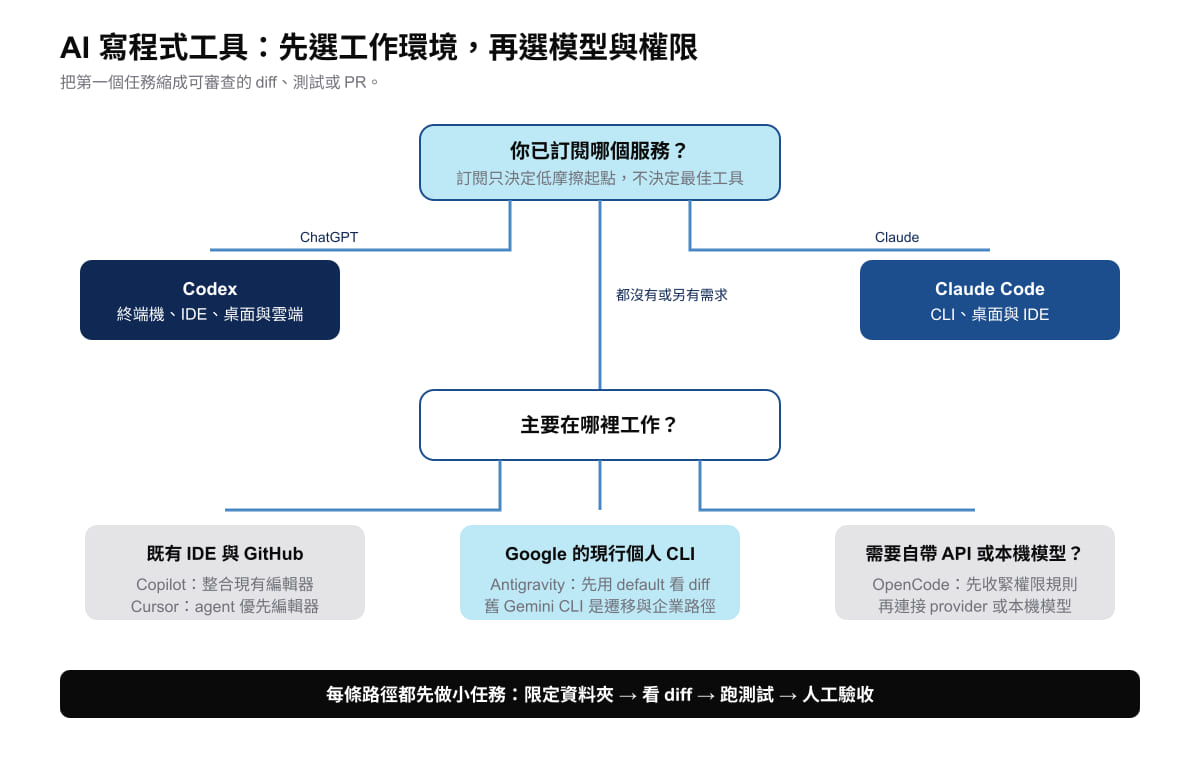
Original diagram: Gwarket / Aaron Huang · CC BY 4.0 ·
An existing subscription is not the only decision, but it can avoid paying twice
If you already work inside a ChatGPT plan, Codex is a low-friction place to start. If you subscribe to an eligible Claude plan, Claude Code is worth trying first. That does not mean each tool can work only with its own model: both can use API billing, but API usage is a separate billing and credential path.
Conversely, if you want to preserve an established IDE habit, Copilot’s value is mainly that it keeps collaboration in the editor and GitHub; Cursor’s value is that it makes the agent interface part of the editor itself. They are not simply “different model” choices.
One Cursor constraint is easy to miss: Plus is US$8/month, but that tier uses Grok only. Using third-party models such as Claude or GPT requires Premium or above, with related usage charged separately. GitHub Copilot Free can be a lower-cost trial. Its plan page contains inconsistent descriptions of some third-party agents, so this guide does not use that capability as a selection criterion. If you plan to give a task to GitHub’s cloud coding agent, separately confirm the plan available to your account that day and the cloud execution environment.
For permissions, “can write” and “asks first” are not the same control
| Tool | Default starting point | Difference to check carefully |
|---|---|---|
| Codex | A version-controlled folder is workspace-write plus on-request; an unversioned folder is read-only; network is off by default. |
danger-full-access is a sandbox mode while approval policy is separately configurable; only --yolo bypasses both sandbox and review. |
| Claude Code | Interactive CLI and the VS Code extension default to auto from v2.1.283; claude -p and the Agent SDK are Manual. |
plan can still run exploratory commands; Manual does not prompt for every read, because some read-only commands in the working directory can run directly. |
| Cursor | Auto-review runs allowlisted commands directly and attempts to sandbox the rest; sandbox network access is blocked by default and opened by rule. | Its classifier is not a security boundary; Run Everything has neither a sandbox nor a classifier. |
| Antigravity CLI | default shows a diff before writing files and asks before terminal commands; the working directory is trusted first. |
auto requires terminal sandboxing and a personal account; --dangerously-skip-permissions means always proceed, not the default mode. |
| OpenCode | Baseline policy allows actions by default; reading .env asks, and directories outside the project can also be allowed by default. |
Tighten permission rules before connecting real credentials; its plan agent refusing edits does not describe the full permissions of the build agent. |
So read-only, plan, manual, auto, and YOLO are not one shared scale from weaker to stronger. Their meaning is determined by the product, interface, and execution environment. In Codex, sandbox strength and approval policy are two controls. In Claude Code, Plan can run exploratory commands and Manual does not prompt for some read-only commands. Matching labels directly hides the actions that actually need a person’s confirmation.
Google’s routes need to stay distinct: Antigravity is the current individual path; Gemini CLI is a migration question
From 2026-06-18, the Gemini CLI path for free and Google One Google AI Pro/Ultra users moved to Antigravity CLI. Gemini CLI access under enterprise licensing and paid Gemini API keys remains a different situation. This does not mean one key works across every Google product.
Antigravity’s IDE/App plan page says BYOK and custom endpoints are not currently supported, while its CLI lists Gemini API-key and Agent Platform authentication. During migration, retaining GEMINI.md and AGENTS.md is compatibility information, but extensions, skills, and MCP configuration each have their own migration location. Move them item by item according to the migration documentation.
Choose by scenario, then shrink the first task
| Your situation | Start with | First inspectable task |
|---|---|---|
| You already pay for ChatGPT and want to work on an existing repository | Codex | Fix one clearly defined bug, run the existing tests, and review the diff file by file. |
| You already pay for Claude and mostly work in a terminal or IDE | Claude Code | Use Plan to identify files and test commands, then decide whether to allow writing. |
| You mostly use VS Code or JetBrains and your team already uses GitHub | GitHub Copilot | Complete one function and its test in the IDE, or have the cloud agent return a reviewable PR. |
| You want an agent-centred editor workflow | Cursor | Change one component in one workspace, keep Auto-review, and do not switch to Run Everything. |
| You want Google’s current individual CLI route | Antigravity | Generate a diff in default mode and confirm each command; do not copy configuration directly from old Gemini CLI tutorials. |
| You need to bring your own provider, API, or local model | OpenCode | Define the provider, permissions, and rules for outside-project directories before allowing the build agent to act. |
Full access is not a speed setting; it is an environment-design problem
“Fewer approval clicks” is not a reason to disable every protection. Codex danger-full-access is not --yolo; Claude Code’s bypassPermissions still observes deny rules, but its documentation says it does not defend against prompt injection; and Cursor’s auto-review should not be treated as a security guarantee.
When a task needs long-running tests or a large change scope, first put the repository in a container or VM and open only the directories and network access the work needs. Then consider reducing prompt frequency. For an unfamiliar repository, begin in read-only or the default mode.
The final decision is deliberately plain: use the environment you already pay for and already use to complete a small, inspectable task first. Change tools only when IDE integration, model provider, execution location, or permission boundaries block the work. Model names will change; being able to see what changed, where it ran, and why it needs the next permission is the difference that remains.
Sources and verification date
Checked 2026-11-08. These are official product documents and pricing pages. Prices, quotas, and product design can change; check current information on the day you pay or change a setting.
- OpenAI Codex Agent approvals and security, Sandboxing, and Pricing
- Claude Code permission modes, Permissions, and Claude pricing
- GitHub Copilot plans and Copilot CLI tool approvals
- Cursor Agent run modes and Cursor pricing
- Antigravity CLI modes, Gemini CLI migration, and Antigravity pricing
- OpenCode permissions, OpenCode providers, and OpenCode Go